
User guide
How to use Bambú
A short guide to the app, screen by screen. Read it start to finish or jump to what you need.
Getting started
You are up and running in a couple of minutes, with no account and no card.
The first time you open the app
Bambú asks a few questions to set up your practice: what brings you here (sleep better, ease anxiety or get your focus back), how much time you have each day and when suits you best. Then we plant your bamboo, offer you reminders and you take three breaths with Bambú. You can change all of it later.
Your account
- No account: you can use Bambú from the first minute. Until you have an account, your progress lives only on that phone.
- Save your bamboo: in Profile → Settings → Account tap Save my bamboo to an account and choose Continue with Apple, Continue with Google or Continue with email. With email we send you a 6-digit code, no password needed. Your progress moves to the account and follows you to any phone.
- If you used Bambú before: log in with the same email. Your old password still works, or ask for a code.
Language
Bambú is in English and Spanish. By default it follows your phone's language (Automatic). You can listen to sessions in a different language from the app: see Settings → Language and voice.
Your mind
Your calm practice always comes first. On top of it, you choose how much room to give the mind (change it anytime in Settings → Your practice → Your mind):
- Just calm: meditate, rest, sleep. At the end of Today, a short reading in case you feel like it.
- Ideas for the mind (recommended): on top of your practice, Today's reading, a short idea for a calmer life. No challenges.
- Train the mind: a short challenge every day, your training week and your collection of things learned.
The app has five tabs at the bottom: Today, Meditate, Bambú (in the middle), Sleep and Profile.
Today
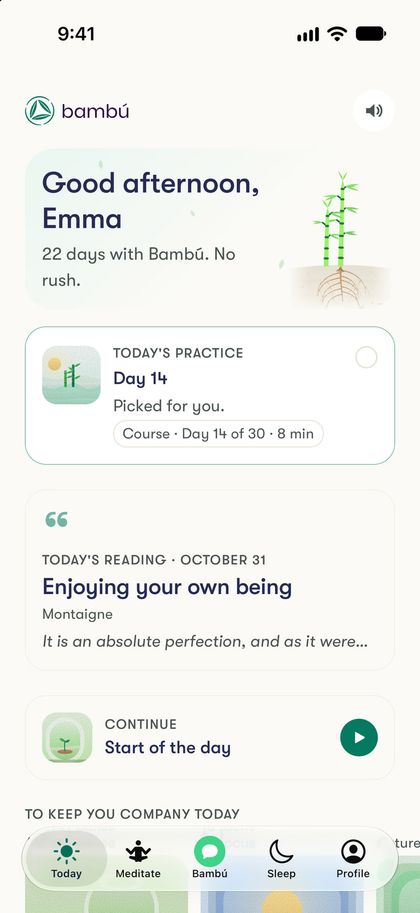
Your day with Bambú on one screen. It changes with the time: practice and ideas by day, rest at night.
Today's practice
At the top is the practice Bambú picked for you, with a line on why. Tap it to start.
How are you today?
The check-in is four taps in about 30 seconds: how you slept, how much energy you have, how you feel (Okay, Tense, Scattered or Low) and how much time you have. Bambú uses it to tune today's practice. Your answers stay between you and Bambú.
Today's reading
- A short reading for every day of the year (366, counting 29 February). Each month has its own theme.
- It's on Today from 5 am to 9 pm, and always in Meditate → Learn, with This month and The year in readings.
- On a reading you can Save the idea or tap Write in my journal to write about it.
- Your first 30 readings are free; after that they continue with Premium.
Continue
Whatever you left halfway, to pick it up where you stopped (for example, the next session of your course).
To keep you company today
Three suggestions for the time of day: a short pause, something to focus or a nature sound by day; at night (For tonight), a sleep meditation, a story or a sleep sound.
Quick actions
- Breathe 1 min: five slow breaths following a circle.
- A sound for now: a sound to play in the background.
- Silence with a bell: a timer to meditate without a voice. Choose the length, an ambience (Silence or Soft breeze) and an interval bell (every 5 or 10 minutes, or none).
At the end of the day
At night, Today invites you to close the day with a line in your journal and brings Sleep closer. The evening reminder, Close of the day, opens a new journal page directly.
Tips and other cards
- Now and then you'll see A tip (for example, how to add the widget). You can tap Not now or Don't show again.
- New in Bambú shows what we published most recently (by day).
- If you chose Ideas or Train, on Sunday you'll see Your week in the mind.
- The speaker button turns the ambient sound on or off.
Meditate
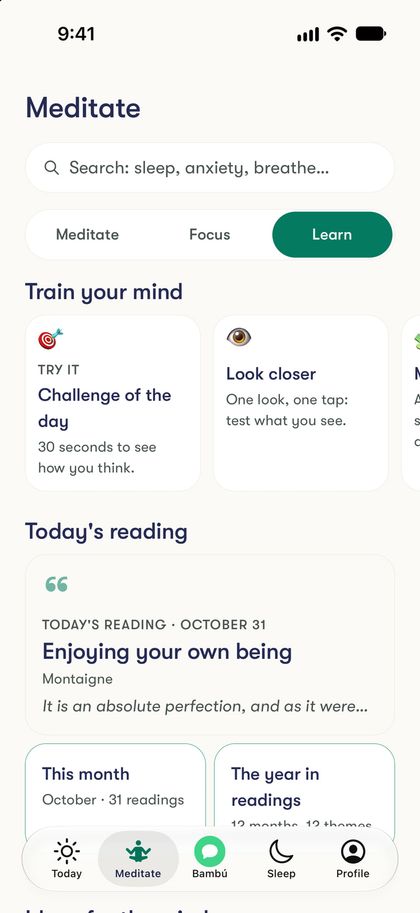
The whole daytime catalog, in three parts: Meditate, Focus and Learn. Search sits on top.
Meditate
- For you now: the session that suits you best right now.
- Courses: each course has its own color and level. Sessions open in order (Finish the previous one first) and you pick up where you left off.
- By what you need: rows such as Anxiety and stress, Focus and clarity, Quick pauses or Emotions, and guided collections.
- Tools (at the end): the Timer to meditate unguided and your Downloads.
Focus
- To work right now and Sounds to focus: wordless ambiences for focused work.
- Get ready to focus: guided practices for before you start working.
- Attention games: Stillness and Follow the light, about two minutes at your pace.
Learn
- Train your mind: the Challenge of the day (30 seconds to see how you think; tap Try it) and Your week, with a different format every day: perception, memory, reframing…
- Today's reading, with This month and The year in readings.
- Ideas for the mind: collections to read at your pace, with no dates.
- What you've learned: the concepts you discover and your Saved ideas.
Search and filter
Type in the search box (for example "sleep", "breathe" or "5 minutes") or tap one of the needs under What you need. With Filter you pick length, time of day, type, Bambú pillar or Free only. Your recent searches stay on your phone only.
Bambú: talk and your journal
The tab in the middle: a place to talk with Bambú or write for yourself.
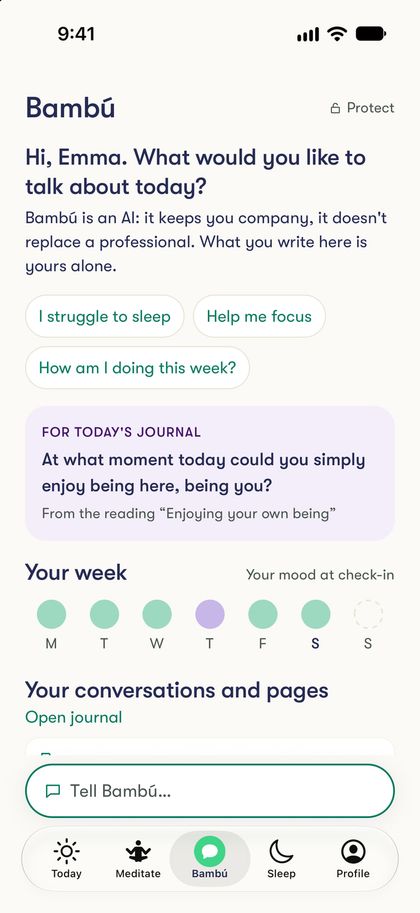
Bambú is an AI: it keeps you company, it doesn't replace a professional. It doesn't diagnose or give medical advice. If you're going through a very hard moment, tap Get help now (in the conversation or in Settings → Help and legal) to see help lines in your country.
Tell Bambú…
Tap Tell Bambú… (at the bottom) or one of the conversation starters. A page opens with two modes at the top: Talk and Journal. Bambú remembers the one you used last.
Talk with Bambú Premium
- You write and it answers: it listens, knows your practice and suggests a session for today.
- By voice: the microphone button opens a call with Bambú. Premium includes some voice minutes every month, which come back on the 1st. Your voice goes straight to our AI provider and isn't stored by Bambú.
- What Bambú remembers: if you want, Bambú keeps useful things (your goals, what works for you). See it, delete it or turn it off in Settings → Privacy and data.
- On the free plan, nothing you write in Talk is sent to an AI: you can Save it in my journal or try Premium.
The journal
- A page to write without overthinking it, just for you. If you like, add how you feel with one of the 12 emoji moods.
- After writing you can tap Talk it over with Bambú Premium.
- The journal is free for 30 entries; with Premium it has no limit. What you already wrote stays yours: you can read, edit or delete it.
- For today's journal suggests a question to get you started.
Your week, conversations and pages
- Your week: your mood from each check-in, day by day.
- Your conversations and pages: what you've written and talked about. Tap a day to see it, or Open journal.
Lock it with Face ID or fingerprint
Tap Protect (at the top of the Bambú tab) or go to Settings → Privacy and data. Bambú will ask for Face ID, Touch ID, your fingerprint or your phone's passcode to open your conversations and journal; the rest of the app stays open. You choose when it locks again: immediately, after 5 minutes, 1 hour or 4 hours.
Sleep
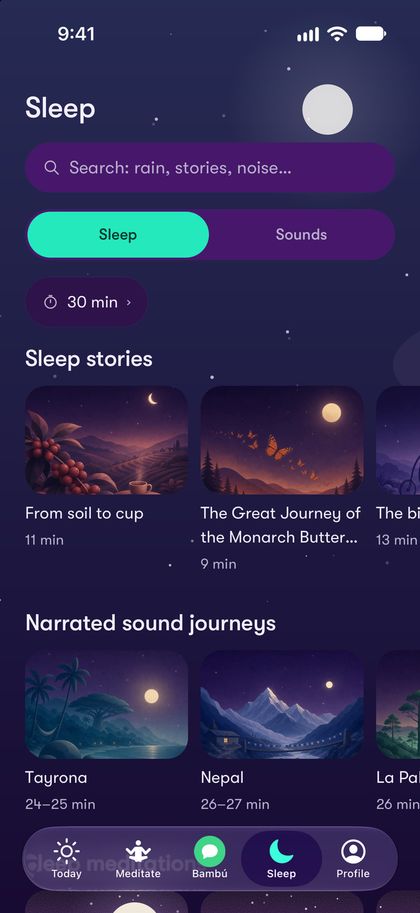
Always in night mode, with everything you need to let go of the day.
Sleep
- Sleep stories, Narrated sound journeys and Sleep meditations, each with its own illustration.
- Music, nature sounds and wordless sound journeys.
Sounds
- Rain, sea, forest, soft noise and music, and To sleep all night.
- Mix two sounds: pick a Sound 1 and a Sound 2 (say, rain with piano) and set the volume of each. Both loop and fade out together. You can also add a second sound from the player with Add a sound.
Timer and sleep mode
In Sleep settings you choose how it ends: When it ends (plays once and ends in silence), with a timer (music and sounds repeat and everything fades out after the minutes you pick; 30 by default) or All night. Anything you play from Sleep runs in sleep mode: a dark screen, sound that fades in and out gently, and at the end just a "Rest well", nothing else.
The player
What you see while listening to any session.
- Pause and ±15 s: pause or resume, and skip back or forward 15 seconds. Drag the slider to go anywhere.
- Voice: many sessions let you choose the voice. In English, Maya and Elias guide the meditations and Nora and Julian read the sleep stories; in Spanish there are voices from Spain and Latin America. Bambú remembers your choice.
- Length: some sessions come in several lengths; pick the one that fits today.
- Sleep timer: the session turns itself off. On sounds and music, there's also Repeat.
- Download to listen offline Premium: the session stays on your phone (you can also download a whole course). Your downloads are in Meditate → Tools → Downloads; if you leave Premium, the ones you have stay there.
- Lock screen: the session keeps playing with the phone locked, and you control it from the lock screen.
- About this session: the voice, the length and the course or collection it belongs to.
- Stopping early: if you close halfway, Bambú asks Stop here?. The minutes you listened count for your bamboo.
When it ends you'll see Well done, with the option to Write how I feel in your journal.
Profile
Your progress and your bamboo, which grows every day you practice.
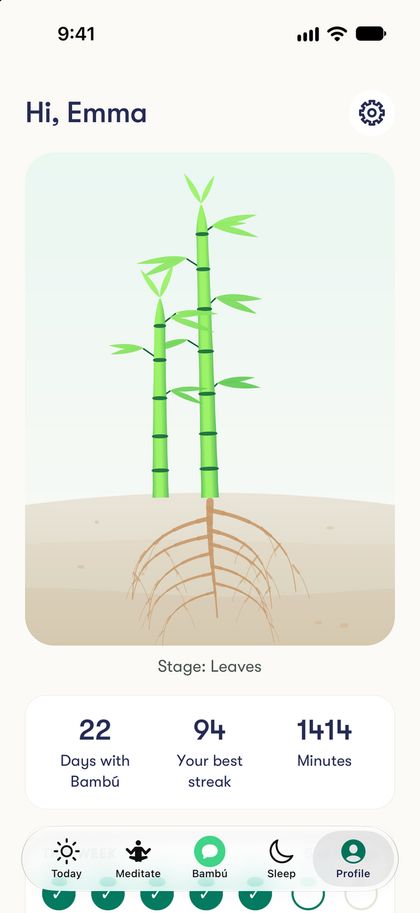
Your bamboo
It starts as a seed and grows in stages: Roots, Stem and Leaves. Missed a day? Your bamboo doesn't die: it rests and waits for you.
Your numbers
- Days with Bambú: the days you practiced. Any practice counts: listening, breathing, reading, writing or training.
- Your best streak and your practice Minutes.
- This week: seven circles, one per day.
Depending on how you use Bambú
- With Just calm: Your calm, what you listened to this week.
- With Ideas for the mind: Your readings this month, the ones you saved and the ones you took to your journal.
- With Train the mind: This week's training and What you've learned.
Your three pillars
Roots (calm: stress, anxiety and sleep), Stem (active mind: attention and reasoning) and Leaves (emotions: journaling and perspective). Below them, Your journal and the way into Settings.
Home Screen widget
Today's reading on your Home Screen: a glance every morning. Tap it and it opens in Bambú.
iPhone
- Touch and hold an empty area of your Home Screen until the apps jiggle.
- Tap “Edit” in the top-left corner, then “Add Widget”. (On iOS 16 or earlier, tap “+”.)
- Search for “Bambú”.
- Choose a size, small or medium, and tap “Add Widget”.
- Place it where you like and tap “Done”.
On the Lock Screen: touch and hold the Lock Screen, tap “Customize” → “Lock Screen”, tap the widget area below the time and pick “Bambú”.
Android
- Touch and hold an empty area of your Home Screen.
- Tap “Widgets”.
- Find “Bambú” (Today's reading).
- Touch and hold the widget and drag it where you like.
If Today shows the tip Add Bambú to your Home Screen, on many Android phones you can tap Add it now and confirm where it goes.
Settings
From Profile, tap Settings. Each row shows its current value.
Account
Your name (how Bambú greets you), your email, Subscription and Sign out. If you don't have an account yet: Save my bamboo to an account.
Your practice
- Your mind: Just calm, Ideas for the mind or Train the mind (see Getting started).
- Reminders: two moments, both on by default: the Morning check-in and the Close of the day. Change the time and days, or turn them off. If they don't arrive, check that notifications for Bambú are on in your phone settings.
- Ambient sound: a quiet sound in the background as you move around the app (Bambú Forest, Rain, Water or Stargazing), with its volume. It goes quiet on its own when you play a session or talk to Bambú.
Language and voice
- App language: Automatic (your phone's), Español or English.
- Session language: the language you hear meditations, courses and stories in. It can differ from the app language. Course progress is kept per language.
- Narrator voice: the voice your sessions start with (in English, female or male; in Spanish, Spain or Latin America). You can always change it from the player.
Privacy and data
- Protect your conversations and journal with Face ID, fingerprint or passcode (see Bambú).
- What Bambú remembers, and whether Bambú can read your journal and check-ins to support you.
- Share usage data: helps us improve Bambú. It never includes your journal, mood or check-ins. You can turn it off.
- Download my data: we email you a file with everything we keep about you (you need an account with an email).
- Delete my account: deletes your account and all your data. Deleting your account doesn't cancel your subscription: cancel it in the store. You can also do it on this website.
Appearance
Match system (the default), By time of day, Day or Night.
Subscription and codes
In Settings → Account → Subscription you see your plan, when it renews or when your trial ends, and Manage in the store. Have a promo code? Redeem it at appbambu.com/redeem.
Help and legal
Get help now, help and contact, Email support, the terms and the privacy policy.
FAQ
Do I need an account?
No. But without one, your progress lives only on that phone. Create one with Apple, Google or your email so you don't lose it when you change phones.
I used Bambú before. How do I log in?
Update the app and log in with the same email. Your password still works, or ask for a code.
Can I listen to sessions in Spanish?
Yes. In Settings → Language and voice → Session language, even if the app stays in English.
Does it work offline?
With Premium, download sessions or courses and listen without a connection.
Reminders are not arriving
Check that notifications for Bambú are on in your phone settings and that a time is set in Settings → Reminders.
Is Bambú therapy?
No. Bambú is a wellbeing and training app. It does not diagnose and does not replace a health professional.
How do I cancel Premium?
From the store where you subscribed (App Store or Google Play). Deleting your account doesn't cancel the subscription.
Help and contact
Something not working, or a question? In the app go to Profile → Settings → Help and legal → Email support: it opens an email with the app version and your phone, which helps us help you. Or write to us directly at [email protected].
Bambú is not an emergency service. If you are in crisis, contact your local emergency services or a helpline; in the app, Get help now shows the ones in your country.